Company management
Invite employees
Last updated: 2023.4.14
A company admin can send an email to an employee who wants to join and invite them to sign up.
The employee who receives the invitation email signs up through the sign-up link in the email and belongs to the company immediately, with no separate approval step.
Only an admin can invite employees.
Who is a CaasWorks admin? (Understanding user permissions) ➡️
Invite an employee
- You can invite employees to the company from the Company management > Invitation menu.
- Click the [Invitation] button.

- Enter the information of the employee to invite, set the permission, and click the [Invitation] button.
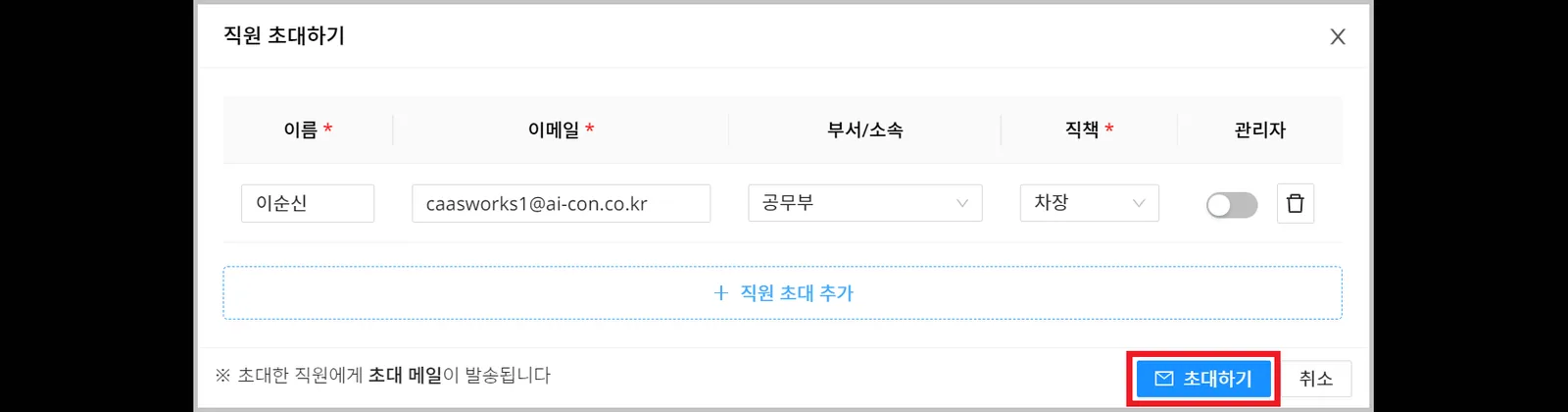
An invitation email is sent automatically so that the invited employee can sign up easily.
- The invited employee's information appears in the list.
Once the invited employee signs up, they disappear from the invitation list, and you can find their information in the Company management > Staff management menu.
