Permissions
Decide who can open Network Speaker and which broadcasts they handle. Only the project owner can see this tab.
People from several companies take part in a project, such as the general contractor, partner companies, and supervisors. Letting everyone play broadcasts would cause problems, so the project owner turns permissions on and off for each member on the Permissions tab.
If you can't see the Permissions tab
You are not the project owner. Granting permissions can't be delegated to someone else.
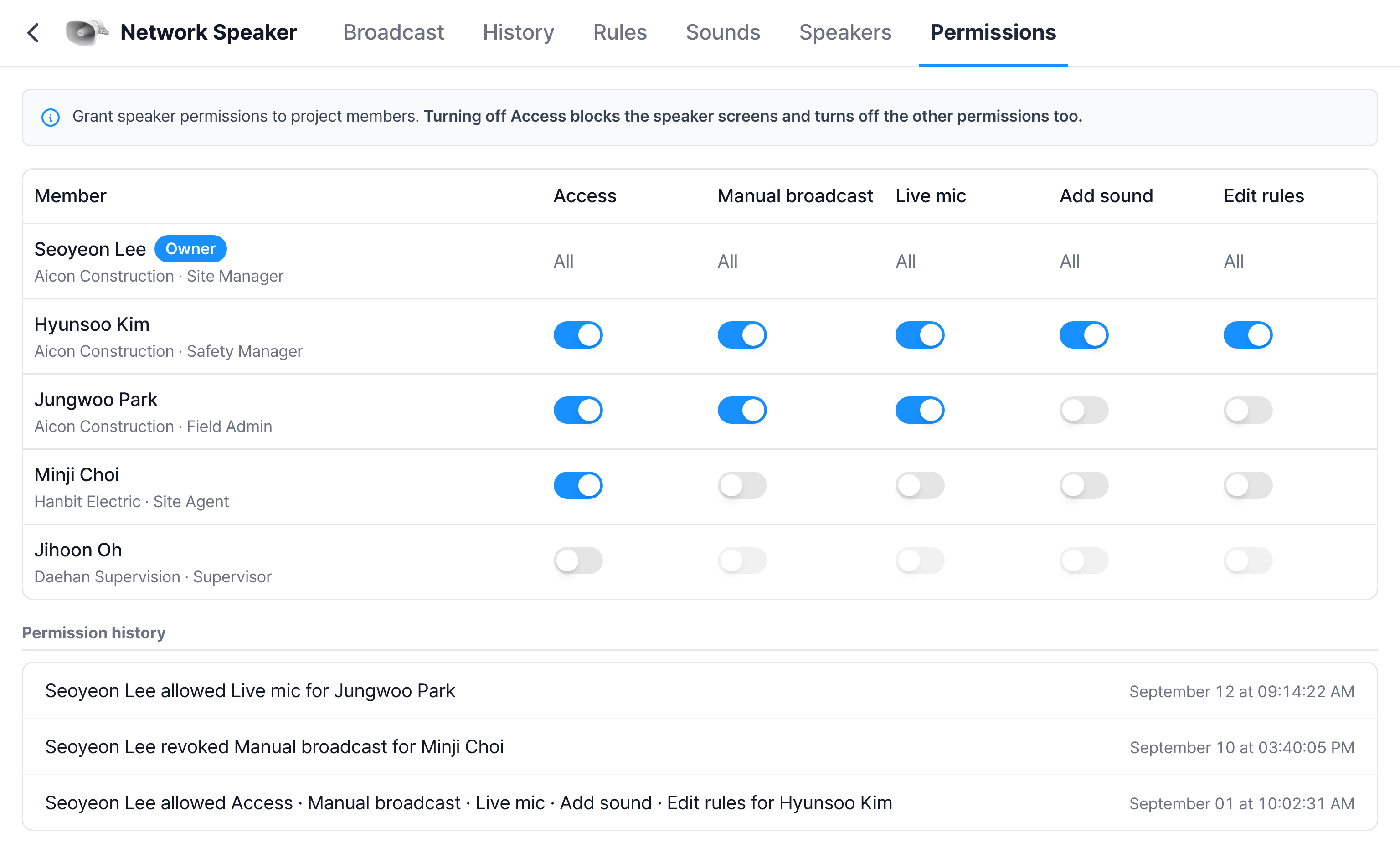
Five permissions
| Permission | What you can do when it is on |
|---|---|
| Access | Open Network Speaker. You can see History, Rules, Sounds, and speaker status. Required for all other permissions |
| Manual broadcast | Pick a sound and broadcast it. You can also change a speaker's volume, Test sound, Mute, and allowed hours |
| Live mic | Speak directly into a microphone |
| Add sound | Add, edit, and delete sounds |
| Edit rules | Create, edit, and delete automatic broadcast rules. You can also change a speaker's zone and location |
Grant and revoke permissions
Click a switch in a member's row to save immediately, and "Permissions changed." appears.
- Turn on Access first. For members with Access off, the other switches are locked.
- Turning off Access turns off the other permissions too. That person can no longer open the Network Speaker screens.
- The owner's row is fixed to "All". This prevents the owner from accidentally turning off their own permissions and leaving nobody able to restore the settings.
When you can't grant Edit rules
If the operator restricts rule editing for this project, a yellow notice appears below the table and the Edit rules switch is locked. This keeps required safety rules from being turned off arbitrarily. If you need a change, ask the operator.
Permission history
Below the table, sentences record who changed whose permissions and how.

Example split by role
It differs by project, but permissions are usually split like this.
| Role | Permissions granted |
|---|---|
| Safety manager | All five |
| Site manager | Access, Manual broadcast, Live mic |
| Field admin or construction staff | Access, Manual broadcast |
| Partner company site agent | Access |
| Supervisor | Access only when needed |
Grant Edit rules carefully. If someone mistakenly turns off a rule or deletes a zone, no sound plays even when a hazard is detected, and that only comes to light after an accident. Whoever handles Edit rules should regularly check the Not playing now filter on the Rules tab.